This video of myself…
Is completely AI-generated.
(Including the voice!)
These days, it’s just one of the wide range of tasks artificial intelligence can do.
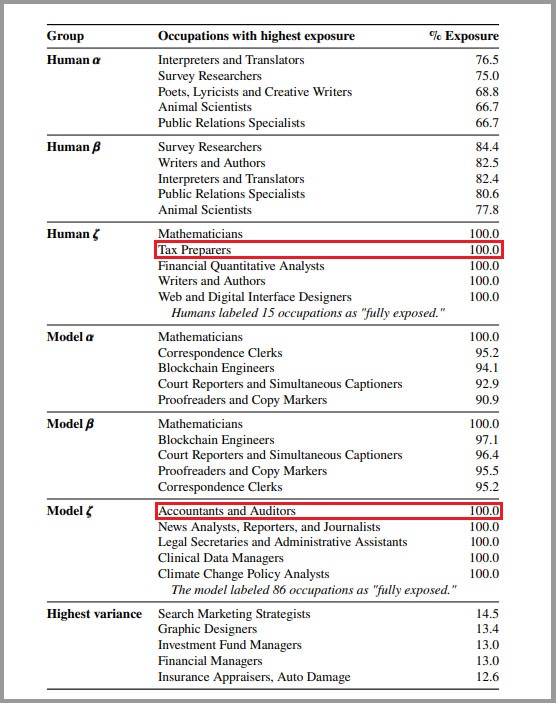
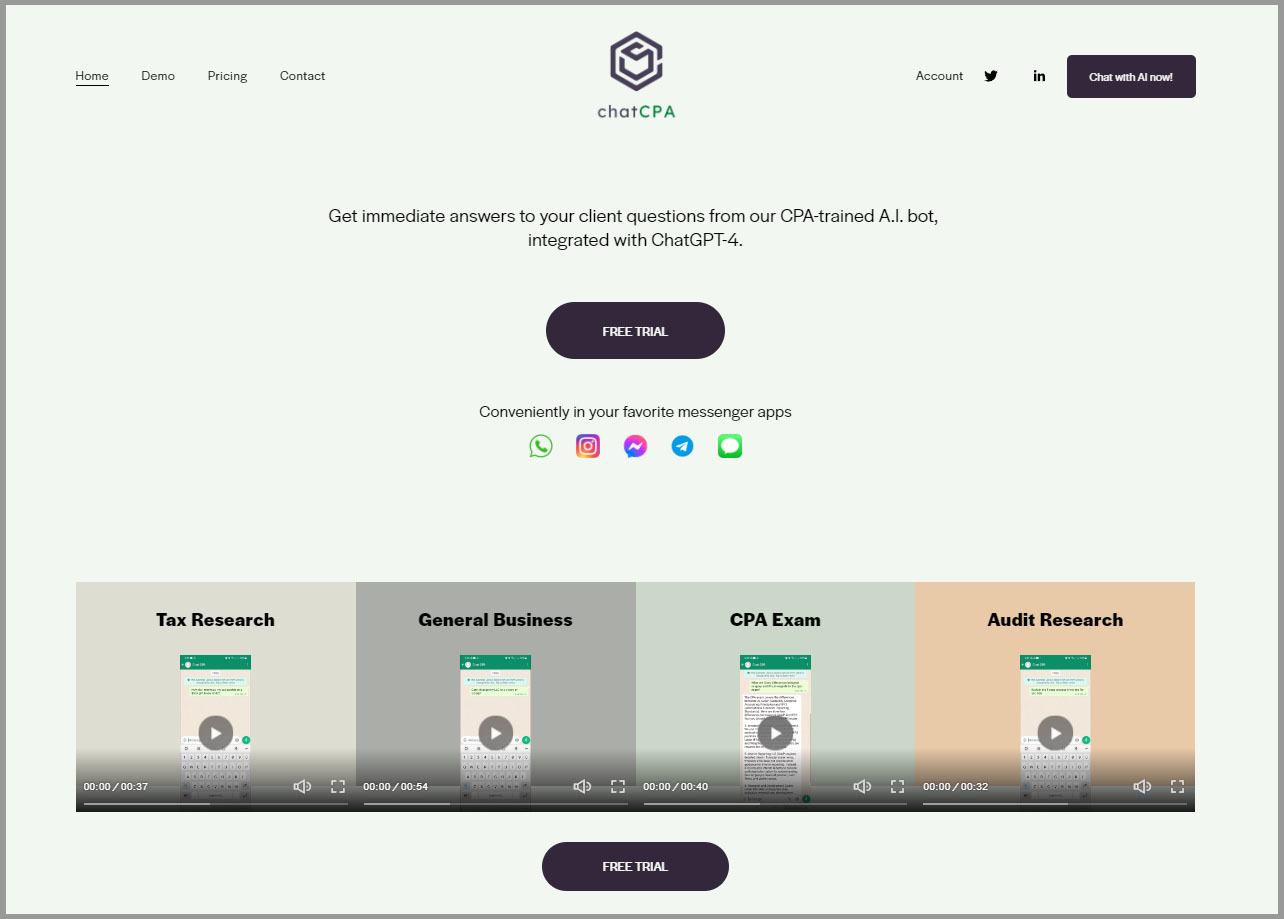
While I had an idea back then of just how much this technology can impact the accounting profession…
I’m still surprised at how impactful it has been.
And it is still transforming the way accounting firms operate.
In this article, I will discuss:
- The role and impact of AI in the accounting industry (with statistics to back it up)
- The benefits (and challenges) of AI implementation in accounting firms
- How accounting professionals can successfully implement AI
- Practical ways to use AI in modern accounting firms
Let’s go!
What Is AI in Accounting?
AI in accounting refers to using artificial intelligence technologies like machine learning, natural language processing, and predictive analytics to:
- Automate tasks
- Analyze data like financial transactions
- Provide insights that help firms make better decisions
- Etc.
Think of it as software that can learn, adapt, and handle complex accounting work without being explicitly programmed for every single scenario.
Now, here’s something important to clarify:
AI is not the same as automation.
Automation follows rigid, pre-programmed rules (e.g., “always categorize transactions from Vendor X as office supplies”).
Yes, AI can automate tasks…
But it learns from data and can make decisions in new situations it hasn’t encountered before.
It can adapt and improve over time based on your historical data.
Can AI Replace Accountants?
In 2014, I was at an Intuit event where QuickBooks announced their cloud accounting product.

It was a big step, but do you know the reaction from the bookkeepers and accountants in the room?
They weren’t happy.
Some felt threatened, and others were legitimately worried.
The question everyone kept asking was, “What are we supposed to do now?”
Sound familiar?
It’s the exact same sentiment we’re seeing today around AI.
Now, there’s a narrative I keep hearing that I’m personally not a fan of:
“If you want to stay competitive, you need to focus on advisory services.”
(Maybe that was partly true in the past.)
But nowadays, AI has evolved to the point where it can even provide pretty decent advisory!
Take RyanBot, for example.
It’s an AI trained on all my expertise and the knowledge from my Future Firm Accelerate program.

While it’s probably not going to give the exact same level of service I personally provide, it does a good enough job if you need advice quickly or I’m too busy to respond.
But don’t forget this:
AI cannot build client relationships for you.
AI cannot make your client feel seen, heard, or valued.
AI can’t do the majority of things that make a good client want to stay with your firm.
And definitely do not forget that clients still look for the human element.
(I shared this on LinkedIn.)

For example, AI can handle basic bookkeeping tasks.
It can even help you analyze pricing data and suggest what to charge for your services.
But unlike a human, AI can’t read the room when you present that pricing to a client.
It can’t see them wince when the number feels too high.
It can’t empathize with their current financial situation or adjust the conversation to make them feel more comfortable about the investment.
There’s just a lot of things AI can’t do, which I talk about in this podcast episode.
So, no…
AI will not replace accountants.
(You can read more of my thoughts on AI taking over accounting jobs here.)
But from an objective standpoint…
The firms that can maximize AI usage will be the ones that stand out.
Because we’re in an age where using AI isn’t an edge anymore…
It’s the bare minimum.
AI in Accounting Statistics
I surveyed over 11,000 accounting firm owners in my Future Firm newsletter to understand how firms are actually using AI right now.
150 firms responded.
These firms are scattered all over the world, but most are located in the United States and Canada.
The data is pretty eye-opening.
For starters, 90% of firms are using AI in some capacity as of November 2025.

(Which means that if you’re not using AI yet, you’re probably in the minority.)
How Is AI Used in Accounting Firms?
When people talk about using AI tools in accounting, they probably think of things like financial reporting, tax return preparation, and a bunch of other accounting processes…
But according to the firms I surveyed, accounting-focused tasks like don’t sit at the top of the list:

Here’s what that looks like in practical terms:
- Rewriting messages to sound clearer, shorter, or more direct
- Preparing follow-up emails after calls
- Drafting newsletters for clients
- Writing blog posts or website updates
- Creating social media posts and captions
- Reviewing client instructions for clarity
- Identifying missing information in documentation
- Turning raw financial data into simple explanations
- Preparing scenario summaries
I think it’s very good to see firms using AI outside of routine tasks related to accounting.
Why?
Because I am a firm believer that if you want your accounting firm to grow…
You should treat it like a business and not a practice.
That’s why, as you’ll see in the organizational chart below, I recommend using “business” titles in your firm like CEO, Director of Sales and Marketing, Senior Manager, etc.

Personally, my favorite answers from the survey are the ones that focus on delivering great client experience, like this one:
“AI lets me summarize long client threads so I can understand the issue in seconds.”
I like it because it focuses on running the business rather than working in it (i.e., making it as easy as possible for clients to communicate with you).
What AI Tools Do Accounting Firms Use?
At this point, you’re probably thinking: “I bet ChatGPT is the most popular tool.”
(You would be right. 🙂)
But what might surprise you is just how popular it is.
Here are the top 10 AI tools accounting firms are using:
Out of 150 respondents, 82% of firms are using ChatGPT.

Compare that to the next tool on the list (Microsoft Copilot) which only 12% of firms reported using.
That’s a massive gap.
Notice something about the top four?

They’re all generative AI tools with conversational interfaces.
This makes sense, because you don’t need to be a technical expert to use them.
You just talk to them like you’d talk to a person, and they do the work.
(If you want to learn more about maximizing these tools, check out my guide to generative AI for accounting firms.)
That said, there is also a lot of interesting stuff outside of these big hitters.
Take Blue J Tax, for example — 8 firms reported using it.
One firm takes complex cross-border tax issues and feeds them into Blue J Tax along with the specific facts of the case.
The AI then analyzes case law and tax rules to predict how a court or the IRS might rule, letting them advise clients with more confidence on whether to take an aggressive position or play it safe.
QuickBooks Online’s AI features also stand out.
Instead of manually reviewing and categorizing 200 monthly transactions, firms let QBO’s AI suggest categories based on historical patterns.
The tool reviews the suggestions in bulk, approves what’s correct, and only manually fixes the outliers.
This cuts what used to take 3 hours down to 45 minutes.
Some firms are using AI tools in creative ways that go beyond the usual suspects:
- Canva: To generate branded social media graphics faster.
- Loom: To record video explanations, then feed the transcript into ChatGPT to draft standard operating procedures. (This is a favorite of mine.)
- Zapier: To create workflows that push data into project management systems automatically
- Wispr: To generate meeting notes during advisory calls
All of this just shows that AI isn’t just limited to compliance work or automating tax returns.
A lot of accountants hear “AI in accounting” and immediately think of balance sheets, financial statements, tax prep, etc.
Sure, these are valuable.
But you need to think bigger:
How can AI help you grow your accounting firm?
What aspects of running your business can AI augment?
Adopting this mindset is what helps you set yourself apart from the competition.
What Are the Benefits of Artificial Intelligence in Accounting?
If you’re going to invest time learning AI tools and getting your team on board, you need to know what you’re actually getting out of it.
Here are real, tangible benefits you’ll see when you use AI in your firm.
More Time for Work That Actually Matters
AI handles repetitive tasks like:
- Drafting emails
- Categorizing transactions
- Generating reports
- Etc.
…So you can focus on higher-level work that only you can do as the firm owner.
Respond to Clients Faster (Without Missing Context)
Ideally, when you respond to clients, it should be fast and contextual.
But that’s hard to balance when you’ve got weeks of back-and-forth emails, random details mentioned in passing, and conversations buried in threads.
Here’s a prompt you can paste into your favorite LLM tool:
You are helping me respond to a client email. I run an accounting firm, and I want my response to be professional, clear, and address their specific concerns based on our conversation history.
Here’s the context:
– Client name: [CLIENT NAME]
– Their main question/issue: [BRIEF SUMMARY OF WHAT THEY’RE ASKING]
– Recent conversation history: [PASTE EMAIL THREAD OR CONVERSATION TRANSCRIPT HERE]
Based on this context, draft a response that:
1. Acknowledges their specific concern
2. References any relevant details they mentioned in our previous conversations
3. Provides a clear answer or next steps
4. Uses a friendly but professional tone that matches how I normally communicate with clients
Keep the response concise.
AI can summarize those conversations in seconds, pull out the key details, and help you craft responses that are quick and accurate.
You’re not compromising on quality just to be responsive.
Reduce Data Entry Errors
When you automate repetitive work, you also reduce the risk of human error.
AI-powered tools can process receipts and invoices with high accuracy.
You avoid typos, misclassified expenses, and fixing errors during month-end close.
Increase Your Capacity (and Your Margins)
Capacity is the most important resource in your firm.
And with AI reducing the hours you spend on each client, you get back more capacity.
Let’s say you’re spending 10 hours per month on a bookkeeping client.
AI helps you cut that down to 6 or 7 hours by automating transaction categorization, generating reports, and drafting client updates.
That’s 3-4 hours you just freed up.
Multiply that across 20 clients and you’ve just gained 60-80 hours per month.
You can use that time to take on more clients.
Either way, your profit margins improve because you’re delivering the same (or better) service in less time.
Stand Out as a Forward-Thinking Firm
This isn’t something many firm owners think about, but it’s a real benefit.
I know this because I was in a similar situation.
When I started Xen Accounting in 2013, it was a fully cloud accounting firm.
And while that sounds normal now, in 2013, cloud accounting firms weren’t really a thing.
It was a very new concept at the time.
That also meant there was an opportunity to be had by being one of the first movers in the space.
Sure, there was a lot to figure out…
I didn’t have a guidebook or best practices to copy.
(And if I look like I didn’t know what I was doing in this photo, I really didn’t.)

But it was easier to stand out, and there was definitely an advantage to that.
Fast forward to today, AI is where cloud accounting was back then.
If you make AI part of your positioning now, you’re still quite early.
When you use AI in smart ways that improve the client experience, you position yourself better than firms that are sitting on the sidelines waiting for someone else to figure it out first.
Yes, you’ll have to figure some things out.
But that’s what helped Xen Accounting become successful.
Clients valued the convenience of cloud accounting, and they were willing to pay for it.
Similarly, there will be a lot of clients today who will value what you can deliver with AI.
Challenges of AI in Accounting
AI is great, but it isn’t a silver bullet.
There are real challenges you need to be aware of before you dive in.
AI Still Needs Human Oversight
AI can do a lot of things, but I don’t recommend completely relying on it.
First and foremost, you don’t want to remove the human element.
That’s the most important part of running a firm.
AI tools still require manual review to catch errors and validate results.
They aren’t always reliable on their own.
They can make mistakes, and they can’t match the critical thinking ability of a person…
Especially you as a firm owner who knows your business inside and out.
One of the most important aspects in any firm is having strong client relationships, because this allows you to retain good clients.
AI can support that goal, but it cannot replace the trust-building that comes from real human connection.
Plus, if you just use AI without any guidance (i.e., without custom prompts, without training it in your voice), you’re going to sound like everyone else.
For example, if you’re pushing out content or articles and you don’t use any prompts, you’re going to sound generic.
And when you sound like everyone else, you don’t stand out, and nobody will want to work with you.
That’s why it’s super important that you guide AI.
Use custom prompts, and train it in your own voice.
In my newsletter, I do get help from AI sometimes just to brainstorm ideas, but ultimately, I write it myself.
(That’s why a lot of people tell me it’s one of their favorite newsletters to read. 🙂)

If you want to see what all the fuss is about, subscribe to my Future Firm newsletter (it’s free)!
It’s the same for our blog posts.
I use AI to come up with a general idea, an outline, or a structure, but I inject a lot of my own thinking into it.
That’s what makes the content valuable.
Skills Gap and Learning Curve
ChatGPT, Claude, Perplexity and other tools like them are all pretty intuitive to use.
Who would say no to conversational interfaces with no coding required to get good output?
However, there are also a lot of layers to their use cases.
For instance, you can create custom projects and custom prompts to get more specific output from your generative AI tools.
If you want to truly maximize them, you will have to invest some time into learning them.
Of course, you can hire someone on your team who specializes in this kind of stuff…
Perhaps a tech lead or a specialist who can leverage these tools and create custom bots or projects that do exactly what you want at the highest level.
In any case, if you want to make the most out of AI, you will need to invest some time into it.
How Is AI Used in Accounting Firms?
It’s time to get into the practical stuff.
These are the specific ways accounting firms are using AI right now, based on real data from the 150 firms I surveyed (plus thousands of firm owners I’ve spoken to over the years).
1. Compliance Work and Routine Accounting Tasks
AI can handle a lot of the repetitive accounting work that eats up your team’s time.
You can use it to:
- Perform financial analysis
- Analyze historical data
- Support expense management and generate expense reports
- Identifying patterns in transactions
- Automate data entry and reconciliation
- Process invoices and receipts
As an example, Dext uses AI for invoice processing.
It scans receipts and invoices, automatically extracts the relevant data, and categorizes expenses without manual data entry from your team.
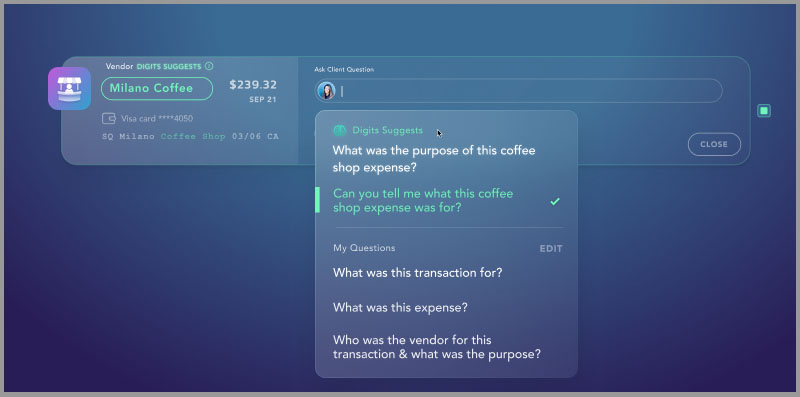
There’s also Digits, which uses AI to analyze client transactions and automatically generate intelligent questions for accountants to send to their clients.
These are impressive, but you shouldn’t be using AI for only this type of work in your firm.
Yes, AI can make compliance work and repetitive accounting tasks easier, but that’s just the tip of the iceberg.
2. On-Demand Advisory for Clients
There is this narrative that I’m not a big fan of:
“If you want to stay relevant, if you want to AI-proof yourself, you have to move to advisory.”
Yes, advisory services are valuable to clients…
And they’re not straightforward like automating routine tasks like I mentioned earlier.
But!
AI has grown to a point where it can deliver pretty good advisory services.
And there’s a lot of value to be had in that.
A good example is RyanBot, which I mentioned earlier.
It’s a chatbot that’s been trained on all my expertise and all the content in Future Firm Accelerate.
Anytime somebody needs my advice, they can go talk to RyanBot and ask it anything they would ask me.
For example, here’s RyanBot helping with pricing a Bronze-tier service package:

RyanBot gives them highly contextual advice, which is a form of advisory.
And this is something you can do in your firm, too.
You can build it into your service packages and pricing plans to add more value for clients without requiring you to put in more time.
It’s super valuable and helpful to them.
They don’t have to wait for you to get back, especially if there’s an issue that’s been bothering them and they need answers as soon as possible.
3. Improving Client Communications
It’s no secret that some clients find it difficult to communicate with their accountants.
A lot of the time, it isn’t because accountants don’t want to get back to them…
But because there’s a challenge in explaining complicated terms to clients.
Plus, combing through all previous conversations to understand their specific concerns and context is extremely time-consuming for a lot of accounting teams.
AI tools can help with this while improving your communication skills as an accounting firm owner.
For example, you can use ChatGPT in conjunction with an AI-powered meeting recorder like Fireflies.ai:
- Copy the transcripts from your conversations with clients.
- Paste them into ChatGPT and ask it to analyze the client’s tone.
Here’s a prompt you can use for this:
You are helping me better understand a client’s concerns and communication style based on a conversation transcript. I run an accounting firm and want to make sure I’m addressing everything they care about, including things they may have mentioned casually or indirectly.
Here’s the transcript of my conversation with the client: [PASTE TRANSCRIPT HERE]
Please analyze this conversation and provide:
1. Tone and emotional state: How does the client seem to be feeling? (stressed, confident, confused, frustrated, etc.)
2. Main concerns: What are their primary questions or issues?
3. Hidden concerns: Are there any underlying worries or pain points they mentioned in passing or hinted at but didn’t explicitly state?
4. Specific details they care about: Did they mention deadlines, budget constraints, past experiences, or preferences that I should keep in mind?
5. Their level of financial/accounting knowledge: Do they seem comfortable with accounting terminology, or do I need to simplify my explanations
6. Suggested response approach: Based on all of this, how should I frame my response to address their concerns and communication style?
Maybe there are specific concerns they mentioned in passing that you didn’t actively notice or hear straight out.
From there, you can craft responses that address those concerns directly.
You can also use AI to simplify complex concepts.
Let’s say a client asks a pretty technical question that’s hard to explain.
You can ask an AI tool to simplify that concept based on what the client is dealing with right now and suggest the right things to say to reassure them.
This also means you’re not the only person who can reply to your clients.
When you’ve got an AI tool that’s been trained in the way you speak and communicate and can break down the specific nuances of your clients and their concerns…
Anyone else on your team can handle communications from there.
You get a consistent approach to the way you communicate, which removes you as the bottleneck for client communications.
4. Creating Standard Operating Procedures
Standard operating procedures aren’t super fun to create.
But they’re incredibly important to every accounting firm.
Without SOPs, the procedures only live inside your head.
This means if you’re not available and something needs to get done, it doesn’t get done because your team doesn’t know how to do it.
At Future Firm, we have about 170 SOPs.

(I’ll let you estimate how many hours it would take to create that many SOPs.)
But with AI, you can cut that time down significantly.
Here’s one of my favorite AI use cases:
It involves Loom (the video recording tool) and ChatGPT.
Instead of starting from scratch on a Google document writing an SOP…
- I record a Loom video of myself doing whatever process I’m documenting. While I’m doing this, Loom is recording the transcript.
- When I’m done recording, I take the transcript from the video, paste it into ChatGPT, and ask ChatGPT to write a standard operating procedure based on the transcript.
This works even better if you have an existing SOP and you tell ChatGPT to follow that style.
But even without a template, it’s still going to output a pretty decent SOP from scratch.
This process saves you a ton of time.
You can link to the video from the SOP too.
If there’s any confusion between your team members about how to do something, they can watch the video and have all the visual context they need to follow the process step-by-step.
You can delegate this to someone on your team whose job is specifically to handle operations, so you can protect more of your capacity.
5. Support in Budgeting and Forecasting
AI can help you spot patterns and trends in financial data that you might otherwise miss.
Instead of manually combing through months of transactions and financial documents to build projections, you can feed your data into AI tools and ask them to do things like:
- Identify trends
- Flag anomalies
- Help you predict financial outcomes
Here’s a prompt you can use:
You are a financial analyst helping me review financial data to support budgeting, forecasting, and audit preparation. I need you to analyze this data comprehensively and surface insights I might miss during manual review.
Here’s the financial data: [PASTE YOUR DATA HERE – this could be transaction history, P&L statements, cash flow data, or other financial records]
Please analyze this data and provide:
1. Trend Analysis: What patterns do you see over time? Are revenues increasing or decreasing? Are certain expense categories growing faster than others? Identify any seasonal patterns or cycles.
2. Anomaly Detection: Flag any transactions, amounts, or patterns that seem unusual or inconsistent with the historical data. This includes: – Unusually large or small transactions – Unexpected changes in spending patterns – Duplicate entries or potential errors – Transactions that don’t fit typical business activity
3. Cash Flow Predictions: Based on the historical data, what does cash flow look like over the next 30, 60, and 90 days? Identify potential cash crunches or surplus periods.
4. Revenue and Expense Forecasting: Project likely revenue and expenses for the next quarter based on historical patterns. Note any assumptions you’re making.
5. Risk Factors: What financial risks or red flags should I be aware of? This could include: – Declining revenue trends – Rising costs in specific categories – Irregular payment patterns – Potential compliance or audit concerns
6. Actionable Recommendations: Based on this analysis, what should I focus on? What questions should I be asking my client? What areas need closer examination?
Present your findings in a clear, organized format that I can use for client discussions or strategic planning.
This is useful for predictive financial analysis, where you’re trying to forecast cash flow, revenue, or expenses based on historical data.
AI can process large volumes of information quickly and surface insights that support strategic analysis of your client’s financial position.
You can also use it to prepare for financial audits by identifying inconsistencies or unusual patterns in financial documents before the auditor does.
It’s not going to replace your judgment or expertise, but it can save you hours of manual review and help you catch things you might have overlooked.
6. HR and Hiring Support
Another use case for AI is in HR and hiring.
Instead of manually going through every resume from every candidate, you can compile all of the documents and files, then ask an AI tool to do a quick screening process.
You’re still going to have to do some manual work eventually.
But in these initial stages, you can ask the tool to weed out the obviously incompatible candidates…
The ones without the specific expertise and skills you require.
This workflow alone is going to save you a lot of hours.
Once you get past that and move into the interview stage, you can use AI there too.
I’ve done this at Future Firm.
The screenshot below is the actual conversation in which I asked ChatGPT to help me decide between four final candidates.
(The keyword here is help me decide, not decide for me!)

When you interview candidates, you can use a recording tool to capture the conversation.
From there, you can train a custom AI tool like ChatGPT on the type of culture you have at your firm.
You can set it up to search for specific characteristics that you value in your team, specific attitudes, communication styles, etc.
Then, you put in the transcript of your interview with the candidate and ask the tool to assess how well they fit those specific characteristics.
When you’ve decided on the ideal candidate, you can ask AI to craft a job-specific job description or even rewrite existing job descriptions to make them clearer and more compelling.
7. Fraud Detection
AI can analyze large volumes of accounting data to identify irregular patterns and anomalies that could indicate fraudulent activity or other financial irregularities.
Tax professionals and accountants can use AI-powered tools to monitor transactions in real-time and flag anything that doesn’t fit expected patterns.
That could be duplicate payments, unusual expense categories, or transactions that fall outside normal ranges.
Here are two tools that do this well:
- MindBridge: An AI-powered financial risk discovery platform that analyzes 100% of transactions to identify anomalies, unusual patterns, and potential fraud. It’s specifically built for accountants and auditors to detect risk in financial data.
- Vic.ai: Focuses on accounts payable fraud prevention. It continuously monitors invoice patterns, flags duplicate payments and unauthorized transactions, and identifies suspicious vendor behaviors before payments are processed.
This is how AI becomes valuable in audit processes.
Instead of manually reviewing thousands of transactions, AI can surface the ones that need closer inspection.
It doesn’t replace your judgment, but it makes the process faster and more thorough.
8. Data Cleanup and Analysis
AI is pretty good for handling data sheets.
For example, you can import a large spreadsheet into ChatGPT and ask it to:
- Analyze the data
- Find duplicates
- Slice it into different graphs and pie charts
If you’re dealing with a challenging set of transactional data from a client, an AI tool can help you make sense of it.
It’s also good at summarizing data.
For example, I’ve done surveys across several firm owners in the past.
These surveys often have multiple fields — rows and rows and columns of data, basically thousands of cells in a big dataset.
(Here is the raw data when I surveyed the Top 50 Modern Accounting Firms of 2025.)

From there, I can pop the spreadsheet into an AI tool and ask it to look for trends, identify patterns, or aggregate responses across different dimensions.
In the example sheet I shared, there’s a column for the average number of hours firm owners worked per week.
ChatGPT was able to quickly identify the distribution of firm owners by the number of hours worked per week:

It was even able to scan through tens of thousands of words to find aggregate mentions of important strategic decisions made by firm owners:

If you’re interested in this data, you can get instant access to our 2025 Modern Firm Report.
Here’s a prompt you can swipe to do something like this:
You are helping me analyze a dataset to uncover insights, identify issues, and make the data easier to understand and work with. I need a thorough analysis that goes beyond basic summaries.
Here’s my dataset: [PASTE YOUR SPREADSHEET DATA HERE or UPLOAD THE FILE]
Context about this data: – What this data represents: [e.g., “client transactions for Q4,” “survey responses from 150 accounting firms,” “expense reports from multiple departments”] – What I’m trying to accomplish: [e.g., “identify spending patterns,” “find common themes in responses,” “spot errors or inconsistencies”] – Any specific concerns or questions I have: [optional – add if you have something specific you’re looking for]
Please provide a comprehensive analysis including:
1. Data Quality Check: – Identify any duplicate entries – Flag missing or incomplete data – Spot inconsistencies (e.g., formatting issues, outliers, data that doesn’t make sense) – Note any errors that need to be corrected
2. Pattern and Trend Analysis: – What are the most significant patterns or trends in this data? – Are there any correlations between different columns or variables? – What stands out as unusual or noteworthy? – Are there any seasonal patterns or time-based trends?
3. Summary Statistics: – Provide key metrics: totals, averages, medians, ranges – Break down the data by relevant categories – Identify the top and bottom performers (if applicable)
4. Visual Recommendations: – What type of charts or graphs would best represent this data? (e.g., pie charts, bar graphs, line charts, scatter plots) – Create 2-3 visualizations that highlight the most important findings
5. Actionable Insights: – What does this data tell me that I should act on? – What questions should I be asking based on what you’ve found? – Are there any red flags or opportunities I should be aware of?
Present your findings in a clear, organized format that I can use for decision-making or share with clients/stakeholders.
One thing AI is super helpful with is generating spreadsheet formulas.
If you’re trying to manipulate a spreadsheet and you want to do something specific (e.g., calculating percentages or any kind of number manipulation) you can just ask it to write you a formula.
You don’t even need to know the specific terms, parameters, or variables.
You don’t need to know how to say those things technically.
You just need to tell the tool what you’re expecting from it and what data you have, and it’s going to figure out the formula you need.
9. Marketing and Sales Support
Most accounting firm owners aren’t trained in marketing.
And while they know they need to ramp up their visibility by creating blog posts, newsletters, social media…
They just don’t have the time or the expertise.
AI makes it possible.
You can:
- Draft blog outlines in a couple of minutes
- Convert your ideas into articles
- Repurpose one piece of content into multiple formats
Pop your ideas into an AI tool like Claude or ChatGPT, and it can structure them into something effective depending on where you plan to post.
I do this with my blog posts, email newsletters, and social media posts.
Here’s a prompt you could use to repurpose your content across different platforms:
You are helping me repurpose content for my accounting firm’s marketing. I have some ideas or existing content that I want to adapt into different formats for various platforms.
Here’s what I want to create: [SPECIFY THE FORMAT – e.g., “a LinkedIn post,” “an email newsletter,” “3 Twitter/X posts,” “a blog post outline,” “Instagram captions,” “a short video script”]
Target audience: [e.g., “small business owners,” “e-commerce entrepreneurs,” “service-based businesses,” “other accountants”]
Tone and style: [e.g., “professional but approachable,” “educational and helpful,” “conversational and friendly”]
Here are my ideas/existing content: [PASTE YOUR IDEAS, ROUGH NOTES, OR EXISTING CONTENT HERE]
Please adapt this content into the format I specified above. Make sure to: 1. Adjust the length and structure for the platform (e.g., keep social posts concise, expand blog posts with more detail) 2. Include a hook or opening that grabs attention 3. Keep the core message and value consistent across formats 4. Add a clear call-to-action where appropriate 5. Match the tone and style I described
If I’m creating multiple pieces (like several social posts), make each one unique rather than just repeating the same message.
Here’s a tip to make this faster:
Once you’ve filled out the format, target audience, and tone sections, don’t type out your ideas.
Use your computer’s dictation feature or the voice input in the AI tool you’re using…
And just talk through your thoughts!
It doesn’t have to be grammatically correct or perfectly connected because the AI will figure out how everything fits together.
The important thing is getting your ideas out quickly so the tool has something to work with.
But it’s not just marketing.
AI can also help with your sales process and with customer relationship management.
Send it transcripts of your conversations with prospects or clients, and ask it to identify what you might have missed, or what each unique prospect values most.
You can frame your sales process around those pain points, refine your messaging, and make your positioning more appealing to the specific types of clients you want to be working with.
How to Implement AI in Your Accounting Firm
Knowing what AI can do is one thing, but getting it working in your firm is another.
Here’s how to implement AI without overwhelming your team or wasting time on tools that don’t deliver.
Make AI Use Part of Your Daily Workflow
The more your team uses AI, the better they’ll naturally get at it.
For example, at Future Firm, AI use is mandatory for my team.
Why?
Because AI is only going to continue to develop in the future.
It will be able to do more things than it can now.
And if you don’t make it a part of your team’s normal workflow, it might lead to your firm falling behind competitors who do.
So, try to find ways in which AI can help.
Is there any task you can automate with it?
Is there any process it can speed up so you have more time for higher-value work?
Pick one or two areas where AI can make an immediate impact like drafting client emails or summarizing meeting notes.
Make it a habit.
The goal isn’t to use AI for everything (you shouldn’t).
The goal is to get your team comfortable using it consistently so they’re ready when AI gets even more capable.
Avoid Shiny Objects
Don’t chase after the latest AI tools with the most features or the most amazing-sounding capabilities.
I call this shiny object syndrome, which you should steer clear of!

Think about what processes you need help with and start with those.
What you want is to build a balanced tech stack for your accounting firm.
You don’t need the latest and greatest, and you don’t need to be using dozens of AI systems.
And you shouldn’t be over-engineering everything.
Don’t go into this with a mindset of “What AI tool should I add today?”
(There’s no end to that tunnel.)
Instead, focus on what you’re struggling with, and think about how AI can help with that specific problem.
If you run into inefficiencies, do the same thing.
But don’t go actively searching for an AI tool and then try to find a use case for it because that’s only gonna slow your team down.
Stick With What Works (And Drop What Doesn’t)
If you’ve invested time (and even money) into learning and implementing an AI tool, but over time you realize it simply doesn’t work for your firm…
There’s no shame in walking away from it.
The goal behind AI tools is that they should make your jobs easier.
If they’re making you slower, if they lead to you spending more time trying to make them work, if it isn’t intuitive or a seamless process for your team…
Then you should reconsider using them.
And when you have found what works for you, stick to that.
Get your team to use it more, get better at it, and maximize the value you’re already getting from it before adding something new.
Provide Support for Your Team
Your team is going to be figuring a lot of this out as they go.
So if there’s any way you can help them, you should.
Maybe there’s an AI course they’re interested in or a book they found about AI that could help them do their jobs better.
Invest in that!
Support could also mean getting somebody on your team who specializes in AI.
This can be someone who can help not only with the implementation but also with training and cross-training your team members.
This doesn’t have to be a full-time role too.
It could be someone who’s already on your team who has an interest in AI and takes on the responsibility of staying current with the tools and helping others use them effectively.
Don’t just mandate AI use and leave your team to figure it out alone.
Give them the resources, training, and support they need to succeed with it.
Want to know what I do with my Future Firm team?
If there is any resource that could help them do their jobs better, whether that’s a course or a book…
The company pays for it.
I encourage them to buy it.
Why?
Because when they get better, the entire team benefits.
For example, I mentioned earlier that AI usage is mandatory in our team.
But that’s easier said than done, and it wouldn’t be fair if I told them to do that and leave them hanging.
So I said this in my team-wide message:

Plus, here’s a very important benefit:
When you support them this way, you’re showing them that you trust them.
You’re showing that they have autonomy in their roles.
This increases their satisfaction and motivates them to continue doing their best work.
I know it works for us because of my team’s high eNPS score!

Don’t Overlook Data Security and Privacy
Yes, you can ask AI to look at financial records, spot patterns, or identify inconsistencies and discrepancies.
But you should always be careful not to share more than you need to.
If you’re uploading client financial data into an AI tool, make sure you’re anonymizing sensitive information first.
Remove client names, account numbers, and any other identifying details before feeding it into the tool.
And be aware of where your data is going.
Some AI tools store the information you input for training purposes, while others may not.
Know the difference, and choose tools that respect client confidentiality.
Your clients trust you with their financial information, so don’t compromise that trust by being careless with how you use AI.
If you’re not sure whether it’s safe to upload certain data, err on the side of caution (or consult with your IT or compliance team first).
Grow Your Accounting Firm With AI
If you’re feeling a bit overwhelmed right now, that’s normal.
AI is moving fast and it’s still growing.
But here’s what matters:
You now know what AI can actually do for your firm and how to start in your own firm.
Pick one thing: maybe it’s using ChatGPT to draft client emails faster or recording a Loom video and turning it into an SOP.
Just start somewhere.
And if you get stuck or need a refresher on any of this, come back to this article.
Bookmark it and share it with your team.
The future of accounting is already here, and you’ve got everything you need to start being part of it.
Now I’d like to hear from you:
What’s the first AI tool or use case you’re planning to implement in your firm?
What’s been your biggest challenge with AI so far?
Let me know in the comments below!