
Looking for one of the top digital marketing strategies to help potential clients easily find you? Then you’ll want to read the rest of this article on SEO for accountants.
In this article, you’ll find out:
- What SEO for accountants is
- Why it’s important for your firm’s growth
- 18 practical tips & tricks to boost your website to the top of Google
Let’s go!
Table of Contents
18 SEO Tactics for Accounting Firms
Measuring and Monitoring SEO Success
What is SEO for Accountants?
SEO, or Search Engine Optimization, is the process of optimizing your website to show up favorably in Google’s search results when a user types in certain search terms in their search engine.
In order to determine where and how your website will rank in search engines for any given search query, Google uses a series of extremely complex algorithms which look at hundreds of different ranking factors.
Google is a business:
They want to make sure their users quickly get the high-quality and relevant information they’re seeking.
This means that if we want to use Search Engine Optimisation as a strategy to rank higher and be visible in Google’s search queries in order to acquire new business, then we’ll have to play Google’s game.
Why is SEO Important?
One word:
Traffic.
And no, not this kind of traffic.

But the kind of traffic that organically brings visitors and new business to your website without the need for Facebook or Google ads:

The more visitors to your website, the more chances you have to turn those visitors into potential clients.
If marketing is important in your firm, you’ll want to tap into Google’s massive estimated audience that’s performing this many Google searches every single second:
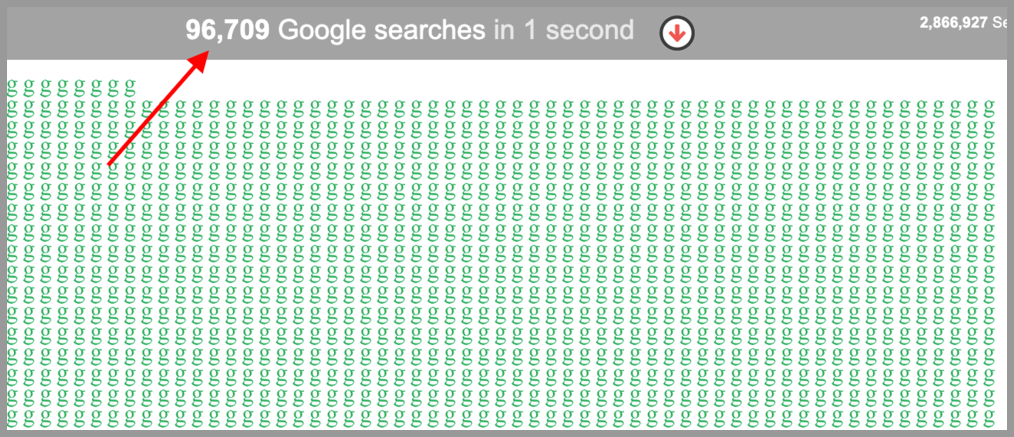
And the accounting firms growing the fastest are leveraging SEO techniques to generate a ton of traffic and grow a super big online presence.
Here’s a report I ran showing how the online bookkeeping and tax service, Bench, is slaying it with Search Engine Optimisation:
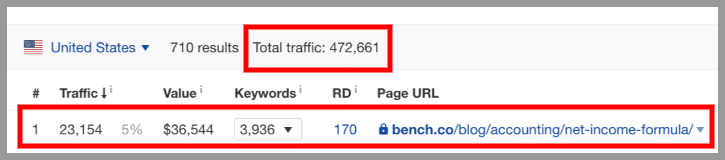
Thanks to their SEO services and strategy, they get 470,000+ website visits each and every single month!
And their top traffic page is a blog post on the “net income formula” which generates 23,000+ website visits in search engines each month.
That’s because they’ve used SEO strategy to get this blog post of theirs to the #1 position for the “net income formula” search term:
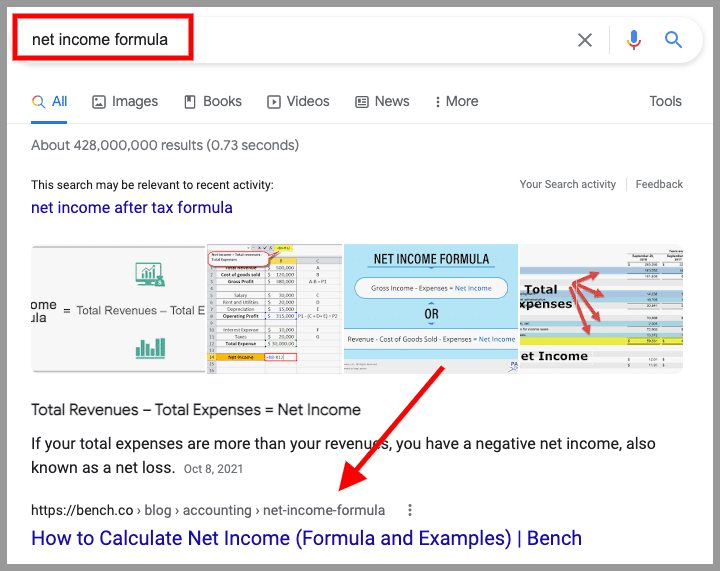
This has been achieved by design through some smart SEO strategies.
With all this traffic, they have a huge opportunity to convert a percentage into new clients.
A great SEO strategy allows you to grow a lot faster if you get it right compared to most other marketing strategies because we tap into one of the largest audiences in the world.
Now that we know what SEO is and why it’s important for your accounting firm, let’s look into my favorite tips that you can leverage to make SEO work in your accounting firm.
18 SEO Tips for Accounting Firms
Here are 18 tips on how to get your firm’s website ranking high on Google:
Tip 1: Setup Google My Business
46% of all Google searches are seeking local information, which means, when someone’s looking for a local accounting firm, they’ll type this into Google:
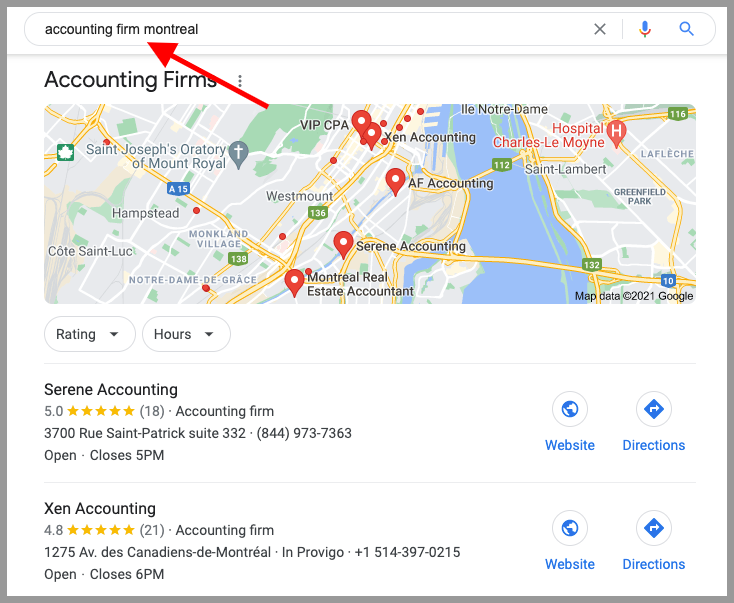
As you can see, my previous accounting firm, Xen Accounting, shows up early on in the search results and on Google’s recommended map. That’s because I had previously optimized the website for local SEO search results.
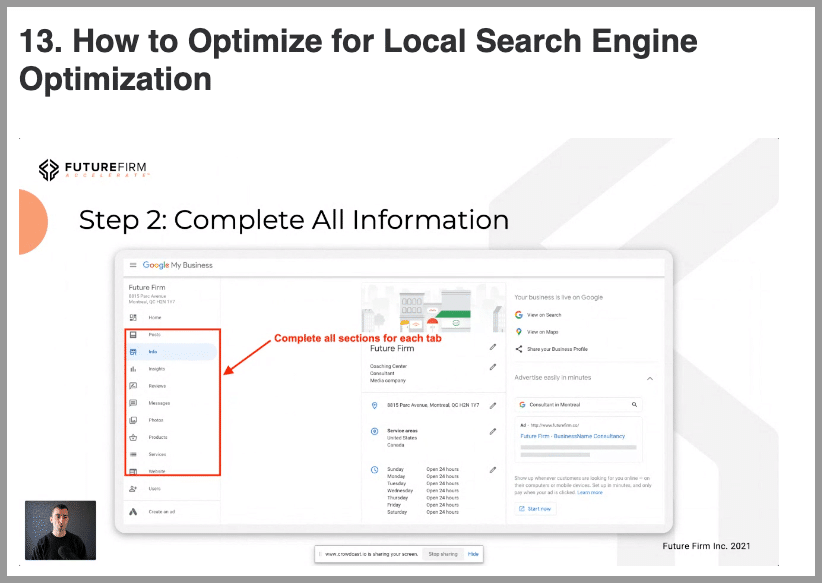
Optimizing your local SEO profile and getting yourself on the map starts with setting up and completing your Google My Business account.
If you’re interested in leveraging quite possibly the easiest SEO strategy on this list, over and above my others SEO training, you might want to check out my full training on how to optimize your local SEO search profile in my Future Firm Accelerate® membership:
Tip 2: Write Quality Blog Content
Your blog is a great way to drive traffic to your site if you can optimize your posts for SEO purposes.
If your blog post is highly relevant, is of high quality, and satisfies search intent, Google is much more likely to want to rank you on their first page.
Google search is very smart, so it knows what blog post is of high quality and what will satisfy search intent, and what won’t.
So focus on quality, rather than quantity to help get your blog posts to the top of the search engines.
I teach how to write high-quality, SEO optimized blog posts in my Future Firm ® Accelerate program as well:

Tip 3: Research Relevant Keywords
You could write the absolute best blog post in the world, but if no one is interested in that topic, that blog post will be useless from a strategic standpoint since it will net you no traffic.
To solve this, use a keyword research tool to show you how many searched for a keyword (ie. a search query) in Google each month and to tell you how hard it will be to get your blog post ranking on Google’s first-page search results.
As an example, using the free ahrefs keyword generator, you can see that this “how to do a cash flow projection” keyword provides the following result:
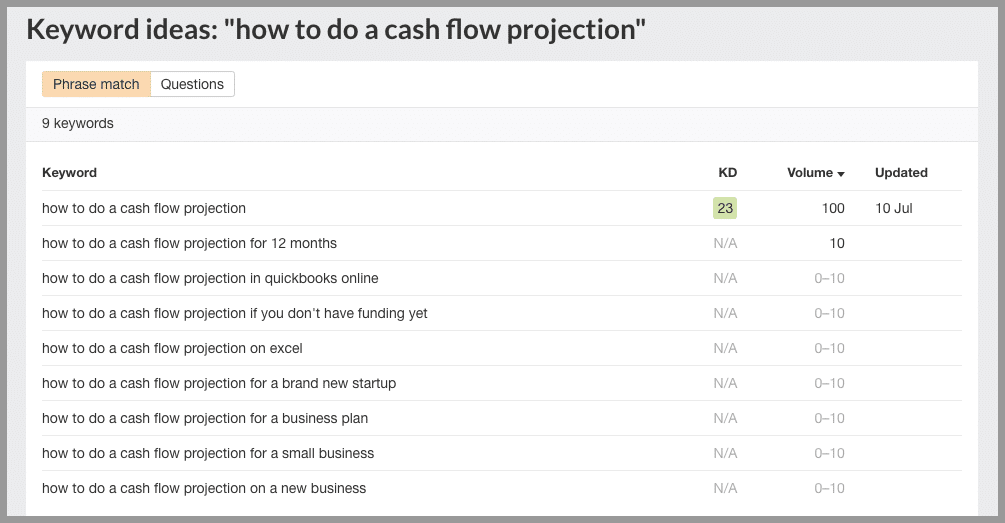
This means that 100 people search for this keyword each month (ie. decent volume), but according to this tool, it’s a medium difficulty keyword (ie. 23/100), so unless you’re a seasoned blogger, you may want to look for another keyword that has a lower difficulty score.
This is strategy is at the heart of your SEO marketing efforts.
Tip 4: Get Backlinks
A backlink is a hyperlink from someone else’s website to your accounting website.
Here’s an example of a backlink from Xero’s blog page back to my site:
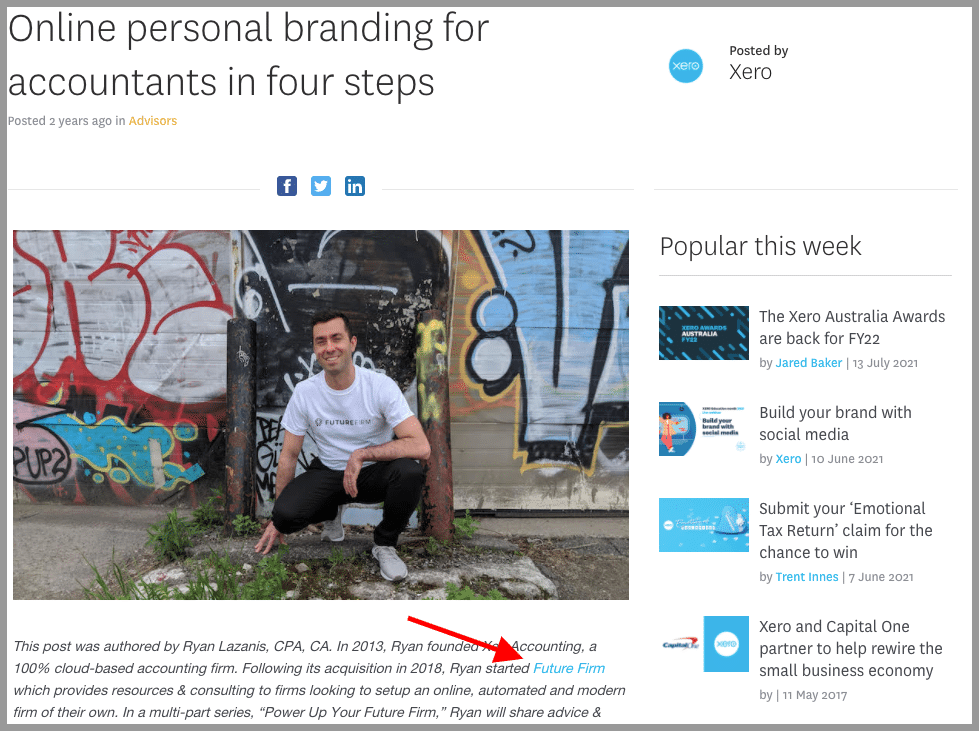
A backlink gives a signal to Google that others are talking about you and that your website is valuable, useful, and credible. The more relevant backlinks you have, the better it will be for your SEO to help push you higher up the rankings.
Not all backlinks are created equally though. Before jumping into this SEO strategy, I’d recommend a bit of research on this topic.
Tip 5: Write Guest Blog Posts
I used to write blog posts on blogs other than my own (ie. a guest blog post) to help gain exposure in the early days. But today I write guest blog posts primarily for one reason: backlinks (see tip 4 above!).
So pitch yourself to write on some prominent blogs in your niche and then make sure that your article has a link back to one of your web pages to help improve your SEO profile.
Tip 6: Use Internal Links
In tip 4 you learned about what a backlink is, which required you to get a hyperlink back to your site on someone else’s site.
Internal linking is even easier.
An internal link is just a link from one page on your website to another page on your website.
You can see in the example below, that my Future of Accounting blog post links to my Accounting Automation Guide blog post:

For example, let’s say you have a really important blog post on your site, and there are 15 other pages on your website linking to it. This tells Google that this is a high-value article and that they should pay closer attention to it, which can improve your chances of ranking higher on Google for that page.
Tip 7: Optimize Existing Content
Have you written a whole bunch of blog posts months or even years ago?
Good news! We can optimize those to show up more favorably in Google’s search results.
Here’s a nifty tool called Surfer SEO that I’ve been using to optimize not only current but past content as well:
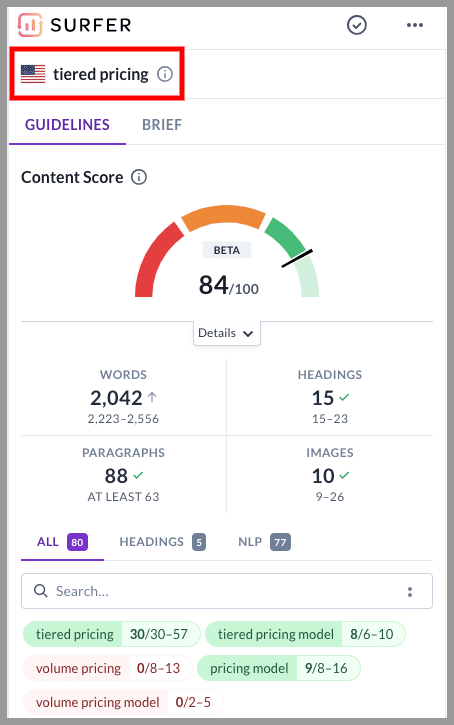
Pop in the keyword you’re targeting (in my example, it was “tiered pricing”) along with the contents of your blog post, and the tool will analyze the current top 10 Google results and let you know what other keyword and content you should add to your blog post to improve your SEO score.
It’s a pretty neat way to help with your organic search results.
Tip 8: Speed Up Your Accounting Firm’s Website
Google wants its users to have an excellent experience and that won’t be possible if they send their users to websites that are slow as molasses.
Use Google PageSpeed Insights to see how fast (or slow) your desktop and mobile website is.
Previously, my website was super slow, but then I worked with a company that helps improve site speed and can happily report this score 🙂

Tip 9: Technical SEO for Accountants is Important
You’ll probably need some help in this area, as improving your technical SEO, is, errrr… technical.
Technical SEO is the process of making sure that your website meets the requirements of modern search engines.
Again, it’s technical, but your web developer should be able to assist in this area.
Here’s a pretty good guide on the topic.
Tip 10: Use Yoast to Tweak On-Page SEO Optimizations
On-page SEO refers to the process of optimizing specific web pages with the goal of ranking them higher in Google.
And luckily, there are a few simple optimizations you can make through the use of a free WordPress plugin called Yoast.
At the bottom of each blog post, Yoast will show you the things you’re doing right and the things you can improve for a given keyword:
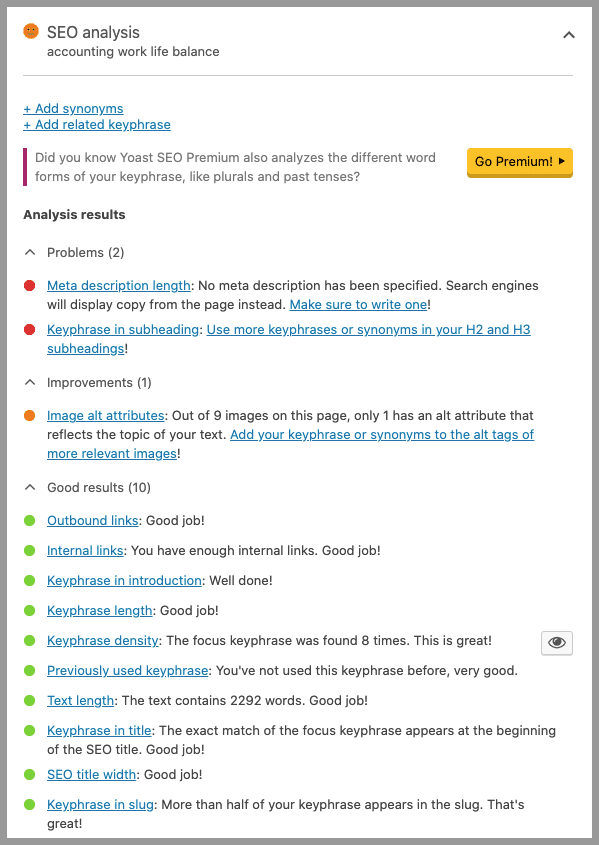
And if you don’t understand their suggestions, just click the respective links in the tool and you’ll get instructions.
Tip 11: Improve Your Meta Descriptions
A meta description is a blurb that appears under your web page link in Google:
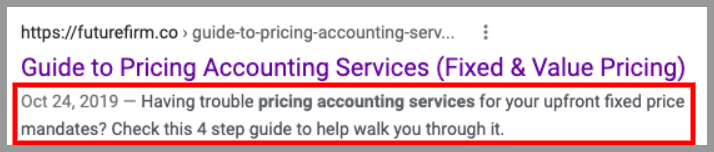
A poorly written meta description that doesn’t generate interest in your content will result in low click-through rates, which tells Google that your content might not be worthwhile.
Analyze your meta descriptions to see which ones might need to be tweaked to get more people clicking on your links.
Tip 12: Make Sure Your Site is Mobile Friendly
Since almost 60% of Google searches are from a mobile device, Google wants to make sure its users are receiving a good mobile experience. This will also boost your website visitors.
Google your site on your phone and see how your website looks. If it’s hard to read and not set up properly for mobile, then speak with your web developer or digital marketing team to get this sorted.
Tip 13: Get Google Reviews
In tip 1 of this article, I discussed how local SEO for accountants strategies can help you and how you can get started.
One of the biggest ranking factors when it comes to local SEO though, are gaining Google reviews:
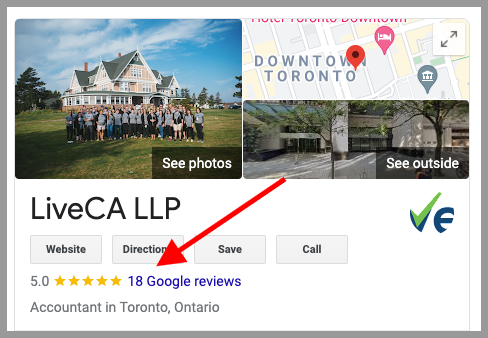
Ask your loyal clients to leave you a Google review or make it a habit to ask for a review as soon as you land wins for your clients. Business leads and potential clients can be generated by good reviews.
Tip 14: Seek a Professional SEO for Accountants Audit
This might be confusing for most accounting firms. So if you have no clue where to start on your SEO journey or if any of the above confuses you, you might need to find a professional SEO company that can start by performing an SEO audit of your site and who can help you make improvements as you go. This could be a dedicated team that focuses on SEO or any digital marketing agency that offers SEO services.
Beware though: I see a lot of SEO services that are generally just a load of hot air.
Tactic 15: Utilize Chatbots
Chatbots can contribute to SEO in a number of ways.
It can enhance user engagement by providing instant responses to user queries. Increased engagement can lead to longer session durations and lower bounce rates, which are positive signals for SEO.
By incorporating relevant keywords in chatbot interactions, you can indirectly contribute to keyword optimization for search engines.

Tactic 16: Apply Schema Markup
Schema markup is a structured data language that can be inserted into a webpage’s HTML code. Its purpose is to furnish extra context to search engines, aiding in a better understanding of the content featured on the page.
Here are some ways schema markup can be beneficial:
- Generate rich snippets: Rich snippets are enhanced search results that display additional information beyond the usual title, URL, and meta description
- Better Understanding of Content: Helps search engines better comprehend the content and its context.
- Improved (CTR): Users are more likely to click on search results that provide additional information upfront.
Tactic 17: Regularly Update Your Published Content
Regularly updating existing content is a strategic practice that I consistently employ to ensure that the information on my website remains relevant and valuable.

As you can see on the screenshot, the published date of this very article and what it is now are different.
Changing the date is easy, but unless you didn’t update the post itself, it won’t matter much.
You have to change or add something legitimately so that the algorithm would recognize the change in dates as valid.
Search engines often prioritize recently updated or published articles, recognizing the value of fresh and relevant content.
Overall, by revisiting and optimizing existing articles, I keep the content of my blog fresh, accurate, up-to-date, and SEO-friendly.
Tactic 18: A Well-Designed Website
There are various ways in which a well-designed website positively impacts SEO. Here are some:
- User Experience (UX): Google considers user experience metrics like bounce rate, time on site, and page load speed when determining search rankings.
- Crawlability and Indexing: This makes it easier for search engine bots to crawl and index content.
- Security: Search engines usually prioritize secure websites
Measuring and Monitoring SEO Success
Remember, SEO is an ongoing process. Consistent monitoring and adaptation are vital for long-term success. Here are the key aspects of measuring and monitoring your SEO performance.
1. Traffic Analysis
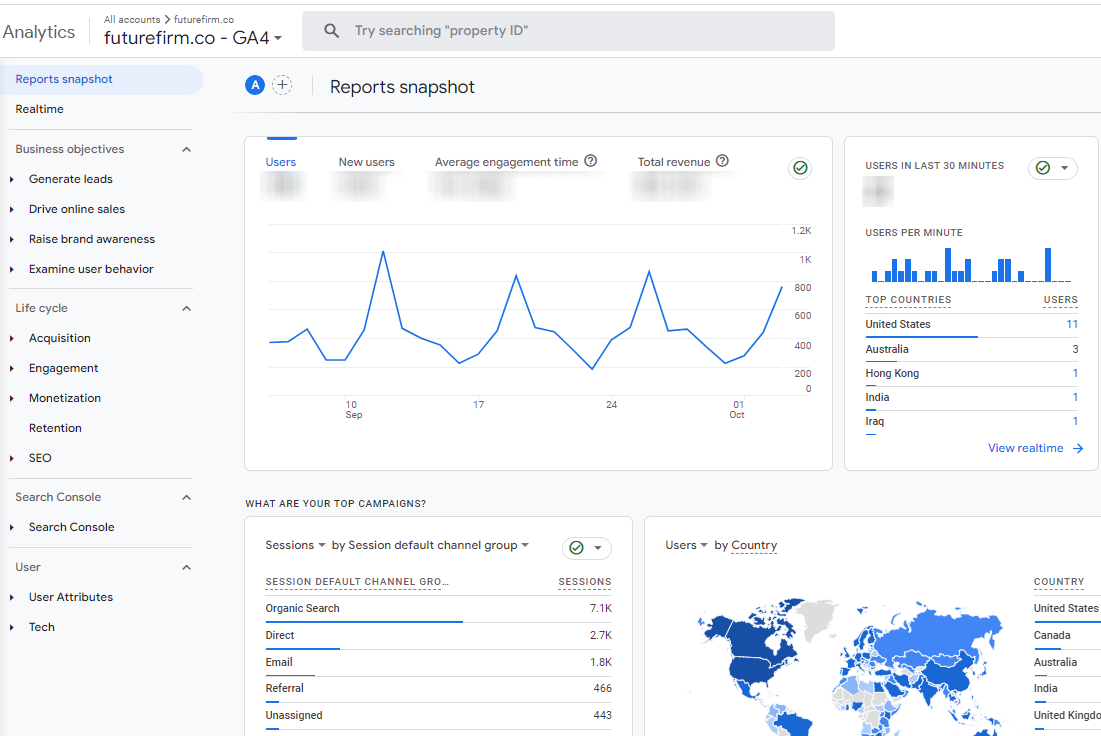
Monitor the overall organic traffic to your website. Tools like Google Analytics can help track the number of visitors coming from search engines.
Analyzing the performance of specific keywords is a must. Identify high-performing keywords driving traffic and focus on optimizing content around them.
2. User Engagement
Analyze the bounce rate to see how engaging your content is. A lower bounce rate generally indicates that users find your content relevant and stay on your site.
You must also evaluate how much time users spend on your pages. Longer dwell times are often associated with quality content.
3. Ranking Metrics
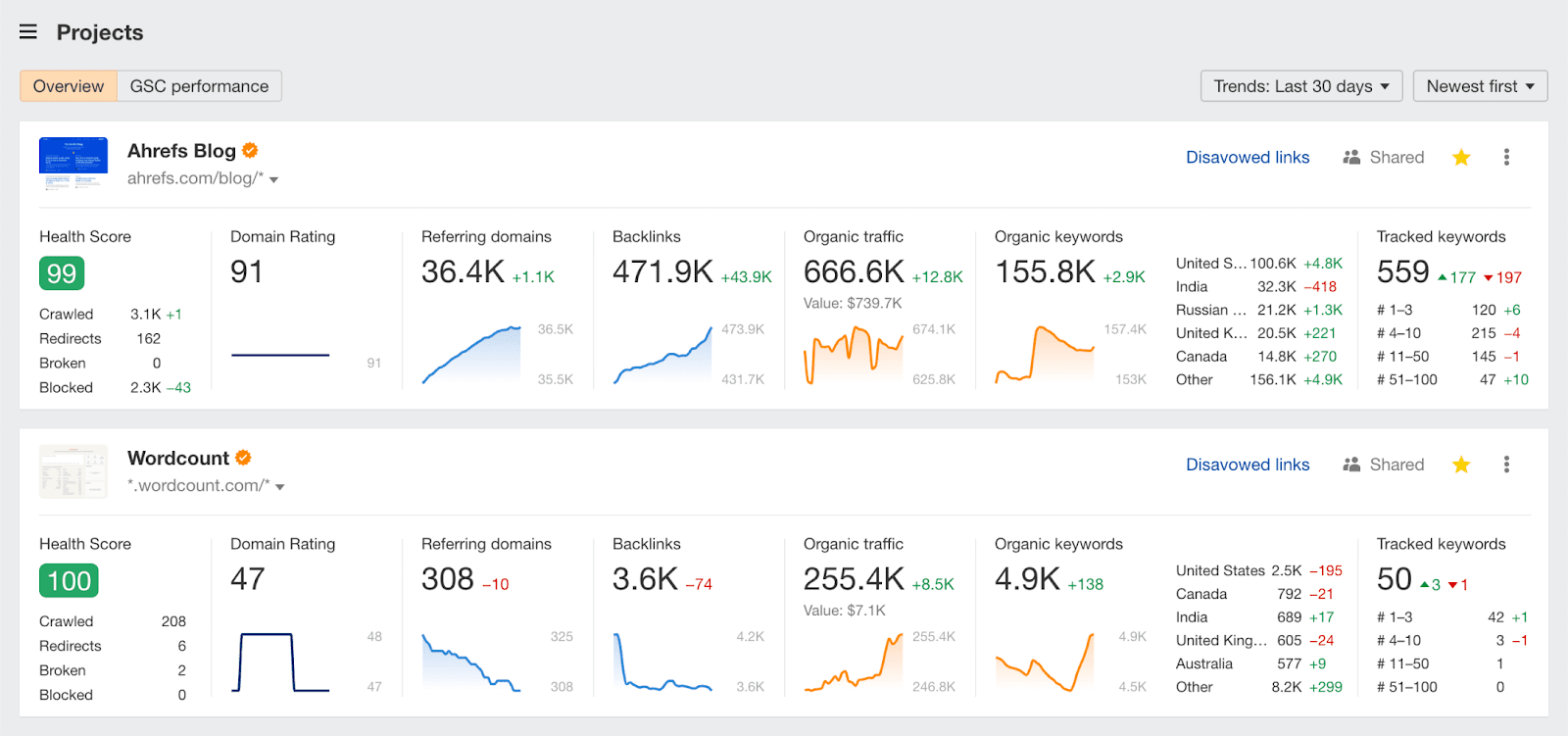
Regularly check the rankings of your target keywords. Tools like SEMrush, Ahrefs, or Google Search Console can provide insights into keyword positions.
Keep an eye on featured snippets, knowledge panels, and other SERP features. Optimizing for these can further enhance your visibility in search engine results pages.
4. Conversion Tracking
Set up conversion goals in Google Analytics. Track how many visitors complete desired actions, such as form submissions or successful acquisitions.
5. Competitor Analysis
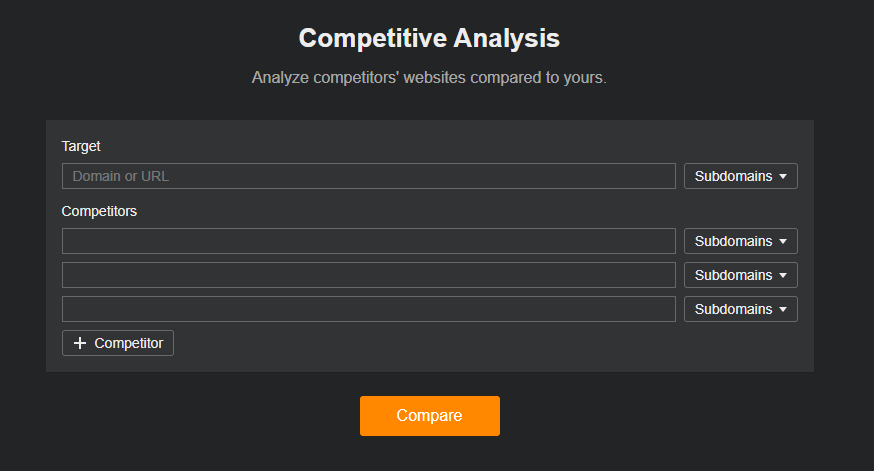
Compare your rankings with those of your competitors. Identify areas where you can improve with tools like Ahrefs, as most likely, they are also trying to climb up the rankings like you.
6. Technical SEO
Regularly check for crawl errors using tools like Google Search Console. Address issues like broken links, duplicate content, or crawl problems.
7. Backlink Analysis
Monitor the quality and relevance of backlinks. Tools like Moz or Ahrefs can help identify new backlinks and evaluate their authority.
Which SEO for Accountants Strategy Will You Try First?
Maintaining SEO for accountants is an important part of digital marketing especially if you are just starting your firm, and it is vital that your firm capitalizes on that. I hope you found this article helpful to find new clients with these strategies!
Which one of the 14 SEO tips did you enjoy most?
Which one will you try first for your accounting firm?
Let me know by commenting below 🙂







Dynamite! You are to your way.
There is no simple answer to this question as it depends on how you define “terrific.” Some people might say that AI is amazing because it can help us automate repetitive tasks or make difficult decisions. Others might say that AI is terrible because it could potentially lead to job loss or even the rise of intelligent machines that could one day surpass human intelligence.
This is wonderful. Thanks. I do the seo for BOMCAS Canada Accounting and tax services and this is very relevant. thanks much
Thanks for sharing knowledgeable blog….